

AI Features
Kudashai's biggest selling point is its AI-Powered capabilities. We integrate Large Language Models (LLMs) into your daily Kubernetes management.
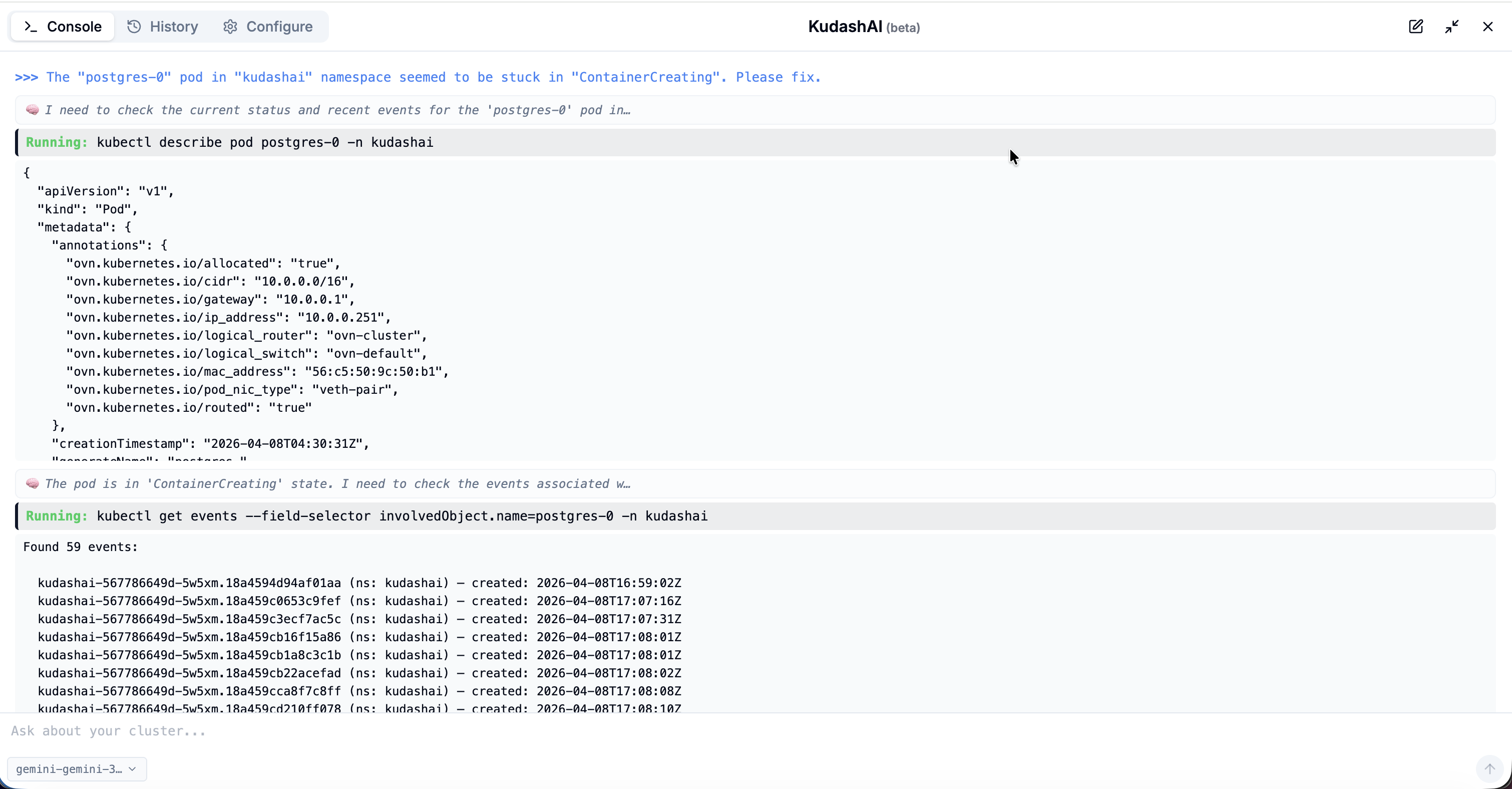
Supported Providers
Kudashai is flexibly compatible with various AI providers:
- OpenAI (GPT-4)
- Anthropic (Claude)
- Google (Gemini)
- DeepSeek
- Ollama (Local AI)
- LMStudio
- OpenRouter
Tested Models
The KudashAI agent is verified against an automated scenario suite (diagnosis from logs, image pull and ConfigMap failures, multi-turn context, safety refusals, and cluster-wide listings). The models below passed every scenario on the current release and are the ones we recommend.
| Model | Provider | Runs as | Notes |
|---|---|---|---|
| Gemini 3.8 Flash | Cloud API | Fastest; under two minutes for the full suite | |
| DeepSeek V4 Pro | DeepSeek or an OpenAI-compatible gateway | Cloud API | Same accuracy as Gemini, slightly slower |
| MiniMax M2.7 | OpenAI-compatible gateway | Cloud API | Verified with the built-in output guards |
| Qwen3 8B | Ollama | Local, about 10 minutes for the suite on Apple Silicon | Best small local model; receives the small-model prompt automatically |
| Gemma 4 12B | Ollama | Local, about 10 minutes for the suite on Apple Silicon | Passes the suite; slower per turn than Qwen3 |
Other models on the supported providers work, but their behaviour is not guaranteed. Local models below 14B are treated as small models: KudashAI shortens the system prompt and adds stricter rules for them. Run Assess on a provider after adding it so the right tier is stored.
AI Capabilities
On the Resource page, you can call upon the AI to perform:
- Automated Troubleshooting: If a Pod fails (CrashLoopBackOff or OOMKilled), the AI will read the logs, analyze the status, suggest solutions, and even provide the corrected configuration code.
- Config Optimization: You can ask the AI to review Security Context configurations, optimal Resource (CPU/Memory) limits, and Best Practices in your deployment specifications.
- Multi-Cluster Diagnostic Scan: Through the AI Console, you can ask the AI to scan metrics and summarize the overall health status of all your clusters at once. Example command: "Provide a summary of error pods across all clusters". The AI will extract the information and present an aggregated summary neatly.
Authorization and Safety
The agent never decides on its own whether a change is allowed. Three checks run in code before a mutating command reaches the confirmation card, and again when it executes:
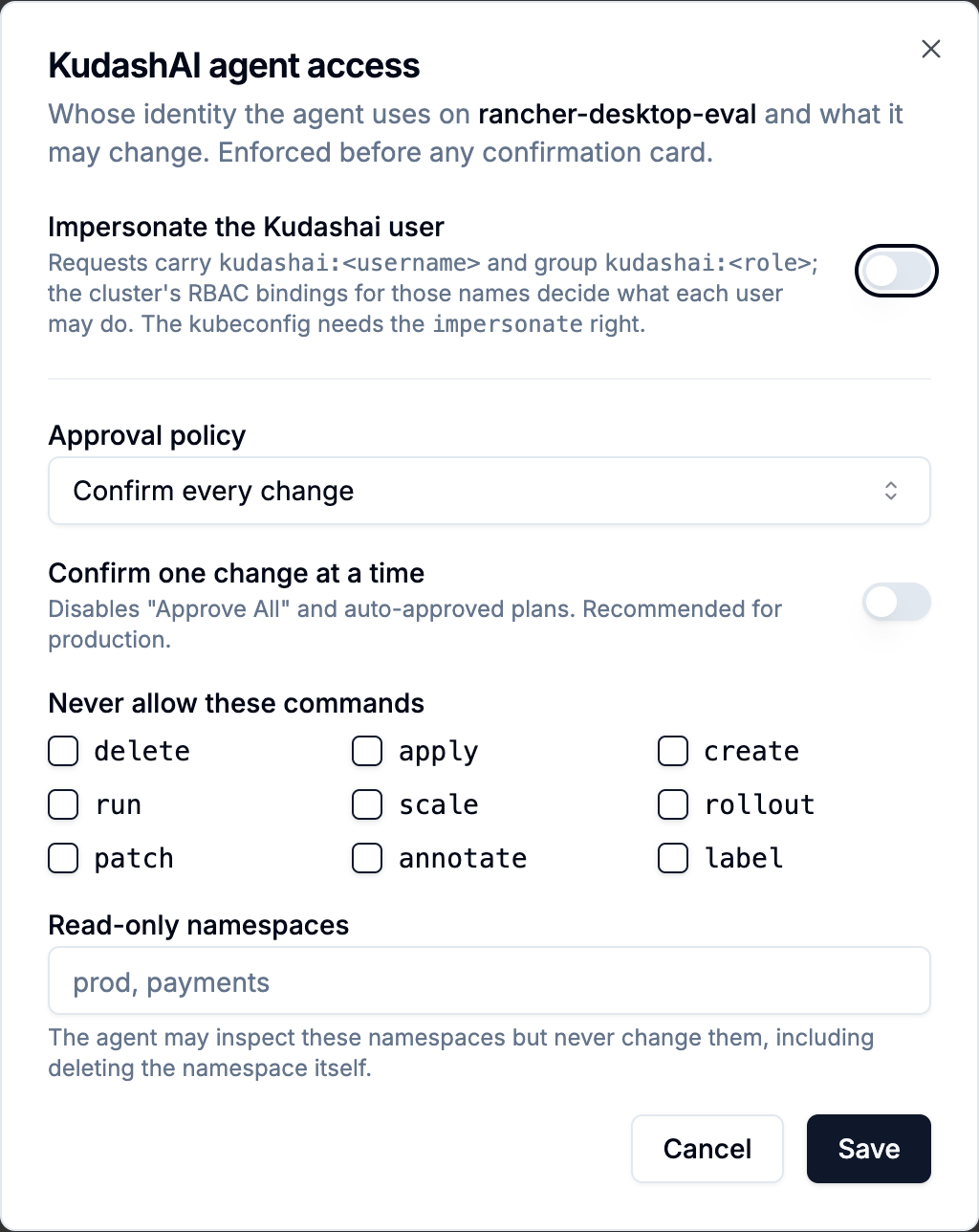
Both controls below are available from Kube configurations: the shield icon on a cluster card opens the KudashAI agent access dialog (users with clusters:manage). The icon turns green while any restriction is active.
- Kudashai role. A user whose role lacks
k8s:write(the Viewer role) has every mutating command refused, whatever the model proposed. - Kubernetes RBAC. Before showing a confirmation, KudashAI asks the API server (a
SelfSubjectAccessReview) whether the identity in use may delete, scale, patch or create that resource. A read-only kubeconfig therefore never produces a confirmation card for a change it could not make; the refusal quotes the server's reason. - Agent impersonation (optional, per cluster credential). When enabled, every agent request carries
Impersonate-User: kudashai:<username>andImpersonate-Group: kudashai:<role>. The kubeconfig registered in Kudashai then only needs theimpersonateright, and the cluster's own RBAC decides what each Kudashai user may do through the agent. Enable it withPATCH /api/v1/app/config/kubeconfigs/<id>/agent-impersonateand body{"enabled": true}, then bind roles in the cluster, for example:
apiVersion: rbac.authorization.k8s.io/v1
kind: ClusterRoleBinding
metadata:
  name: kudashai-viewers
roleRef:
  apiGroup: rbac.authorization.k8s.io
  kind: ClusterRole
  name: view
subjects:
- kind: Group
  name: kudashai:viewer
  apiGroup: rbac.authorization.k8s.io
Independently of these, a built-in safety policy refuses deleting protected namespaces (kube-system, kube-public, kube-node-lease, default), nodes, and blanket --all deletes inside protected namespaces, even after the user approves.
Per-cluster approval policy
Administrators can bound what the agent may change on a cluster, independently of who is asking and of RBAC, with PATCH /api/v1/app/config/kubeconfigs/<id>/agent-policy:
{
  "mode": "confirm",
  "disableAutoApprove": true,
  "denyVerbs": ["delete", "apply"],
  "readOnlyNamespaces": ["prod", "payments"]
}
mode: read_onlymakes the whole cluster read-only for the agent.disableAutoApproveremoves "Approve All" and auto-approved plans, so every change is confirmed one at a time. Recommended for production clusters.denyVerbslists kubectl verbs the agent may never run here.readOnlyNamespaceslists namespaces the agent may inspect but never change, including deleting the namespace itself.
A refused command never reaches the confirmation card; the user sees the policy reason instead. Send {} to reset a cluster to the default (confirm every mutation, Approve All permitted).
Budgets: hard caps per session and per hour
Every cluster carries a budget, enforced in code before each model call and before each change: tokens, model calls and executed changes per session, and model calls and changes per user per hour on that cluster. The defaults (400,000 tokens, 80 calls and 25 changes per session; 400 calls and 80 changes per hour) can be lowered or raised per cluster in the agent access dialog, or set server-wide with KUDASHAI_AGENT_BUDGET_* environment variables. When a session runs out, the agent stops with a message that says which limit was hit; a change beyond the budget is refused like any other policy refusal and never reaches the confirmation card. The counts come from the agent trace, so they survive restarts and cover every entry point. Budgets exist for the day an alert, not a person, starts a session: a storm of alerts must not become a storm of model calls or changes.
Cluster data is never an instruction
Logs, events, annotations and resource names are written by workloads and tenants, so KudashAI treats everything a command returns as untrusted data. Results are fenced and labelled before the model sees them; text that looks like an instruction (for example "ignore previous instructions", "system override", or a kubectl delete planted in a log line) is flagged and reported back to you; and a mutation whose target only ever appeared inside such flagged output, without you asking for a change, is refused before any confirmation. Every step, including refusals, is recorded in the agent trace for audit.
Every change is dry-run before you approve it
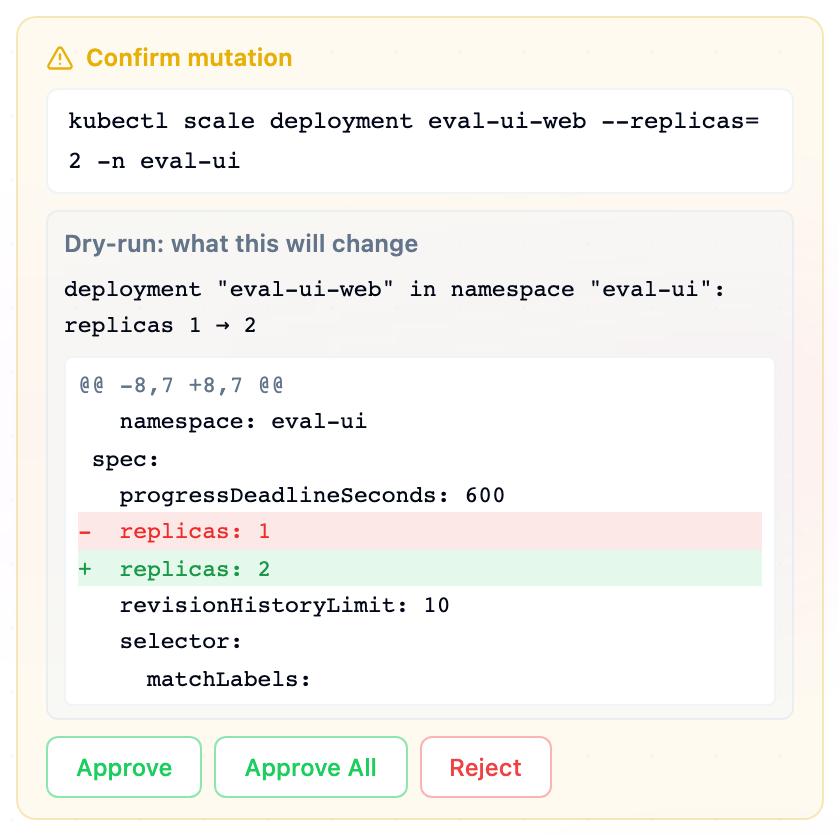
A confirmation card never shows a bare command. Before it appears, KudashAI dry-runs the mutation against the cluster and puts the result on the card: what will happen in operator terms ("deployment web in shop: replicas 3 → 0", "its 3 pods will be terminated and not recreated", "managed by ReplicaSet api-7d9, so a replacement pod will be created") and, for patches, labels, annotations and kubectl apply, a unified diff of the object before and after. Deletes are checked by reading the target; creates, patches and applies use the API server's server-side dry-run, so validation, quota and admission failures surface at this point. A command the cluster rejects in dry-run never reaches the card: the error goes back to the model, which corrects the command or reports the problem, and nothing is executed. Plans are checked step by step the same way. If a cluster cannot dry-run a change (an admission webhook without sideEffects: None), the card says so and still asks for your approval. A failed dry-run never widens the change either: when the namespace you named does not exist, the agent reports that instead of creating the namespace on its own.
Memory: what the agent remembers, and who decides
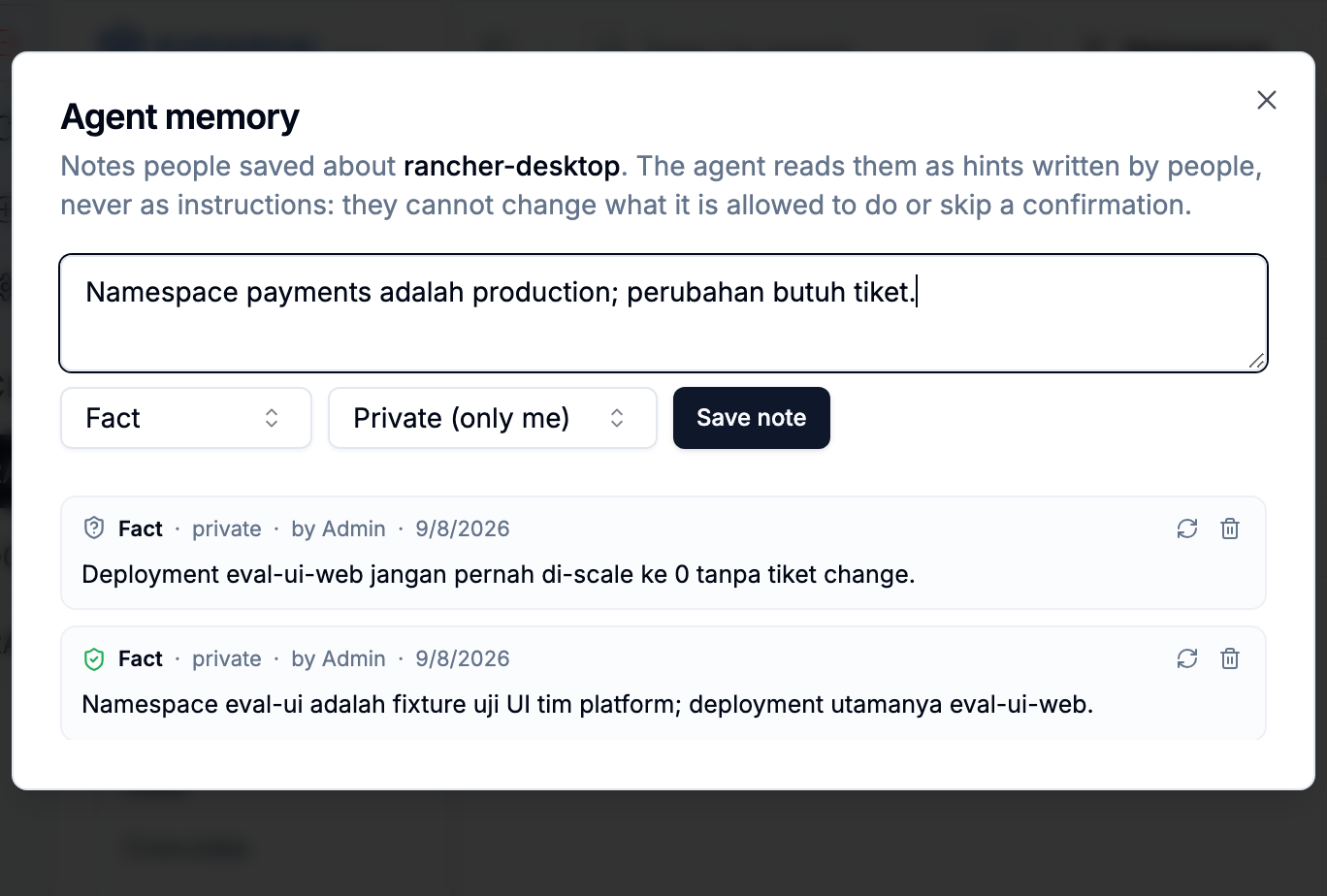
The agent keeps two kinds of context beyond the current message. Inside a session, history that no longer fits the model's context window is condensed into a ledger (what you asked, what was answered, which commands ran and how they ended) instead of being dropped, so a follow-up such as "scale it back" still refers to the right resource. Command outputs are never carried forward in that ledger.
Across sessions, people can save short notes about a cluster: facts ("namespace payments is production"), preferences ("answer briefly, in Indonesian"), and runbooks (a few kubectl lines). Say "Remember: …" in the chat, use the Memory button in the agent panel, or accept a note the agent proposes after you state something durable. Notes appear in the prompt fenced as memory, with their author, scope, date and verification state, under a rule that memory is a hint written by a person and never an instruction.
Memory cannot be used to poison the agent, by anyone:
- Only people write it. The model may propose a note; you save it. Nothing is ever written from command output, and proposals from a turn that carried flagged cluster data or that name things you never said are discarded.
- Notes are refused at write time when they try to change behaviour rather than describe the world: "auto-approve", "without confirmation", "ignore the rules", role or permission claims ("this user is an admin"), conditional triggers ("when X happens, delete Y"), mutation commands outside a runbook, and anything that looks like a credential.
- Runbook lines must parse, use supported verbs, name their targets, never delete a namespace or use
--all, and every step still goes through the confirmation card when it runs. - Cluster-wide notes need
clusters:manage; everyone else's notes are private to them, so a wrong note has a small blast radius. The author, and for shared notes any cluster manager, can delete a note; every write and delete is in the agent audit trail. - Namespaces a note names are checked against the cluster when it is saved and when it is re-confirmed; a note that names something that does not exist is marked, and the agent is told to verify a fact with a read-only command before any change that depends on it. Notes expire after 180 days unless confirmed.
The cluster says whether a change worked, and every change can be undone
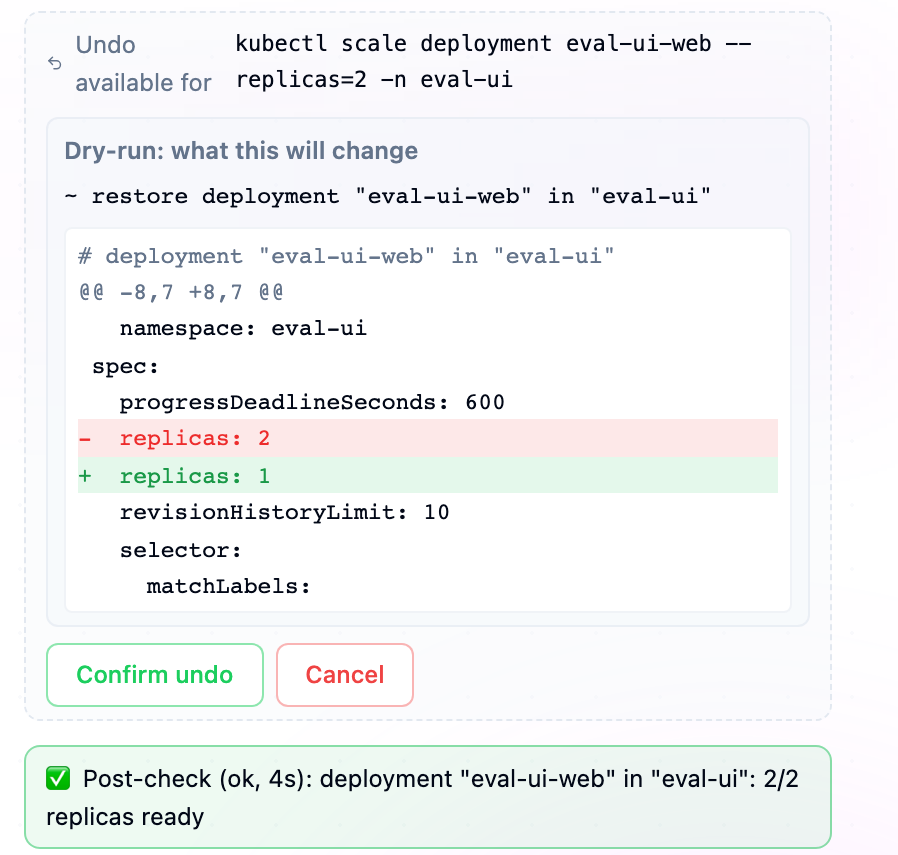
After a change is accepted, KudashAI does not take the API server's word for it. It watches the cluster until the effect is visible or a budget runs out: a scale or restart is done when all replicas are ready on the new generation, a delete when the object is gone, a kubectl run when the pod is Running and Ready, an apply when every object in the manifest meets the same bar. The result appears as a post-check line ("ok, 8s: deployment web in shop: 3/3 replicas ready", or "timeout, 45s: 1/3 ready; pods needing attention: web-x (ImagePullBackOff)") in the chat and in the model's own view of the result, so the model reports the observed status. An answer that claims success after a failed post-check gets a visible system note.
Before the change runs, the agent records what it is about to alter: the object as it was, or the fact that an object is being created or deleted. That record becomes an Undo offer under the result. Undo first shows a dry-run of what would be restored, recreated or removed, then applies it on confirmation, verifies the effect the same way, and is audited. It obeys the same rules as the original change: your role, the cluster's approval policy, denied verbs and read-only namespaces. Undo is one-shot and expires after 24 hours; namespaces and controller-owned pods have no undo, because recreating them would not bring back what was inside or would be undone by the controller anyway.
Desktop: a shell that follows the cluster
In Kudashai Desktop the agent panel has a Terminal button. It opens a shell on your own machine, in the terminal panel at the bottom, with KUBECONFIG pointing at a private copy of the credential for the cluster on screen and its context already selected. Your aliases, plugins and cloud CLIs work as they do in your usual terminal; the copy is removed when the shell closes.
Two things connect that shell to the agent:
- Attach terminal. Once a shell is open, the same button toggles whether the last lines of its output travel with your next prompt, so "what does this error mean?" can refer to what you just ran. The output is handed to the model as untrusted data, like any command output.
- Run in my terminal. Every confirmation card gets a fourth choice next to Approve and Reject: the command is typed at your shell prompt and nothing runs until you press Enter. The agent does not execute it and does not retry it. The chat then watches your shell; once the command has finished and the prompt is back, a card shows its output with Show me the result, which hands that output to the agent as your next message. If the card came from a task plan, the remaining steps come back as a Task Plan card for you to run once you are ready.
The host shell exists only in the desktop build. On a server, the endpoints are not available. A terminal belongs to the user who opened it, and nothing reaches it over HTTP except keystrokes: the API types text at the prompt but never appends Enter, so no request can run a command. Opening, typing and closing are written to the audit log.
Session modes: Plan, Confirm, Auto
Pick how much the agent does on its own for the current session, from the Mode menu next to the model picker (keys 1–3 while the menu is open):
- Plan — read-only. Every change the agent would make is proposed as a plan; nothing runs until you execute the plan, and then each step still asks.
- Confirm — the default. Every change is dry-run and waits on a confirmation card.
- Auto — low-risk changes to ordinary workloads (scale, rollout restart, label, annotate, patch, set) run on their own, each still with a dry-run, a post-check and an undo. Everything else asks, and the card says why: delete, apply, anything touching RBAC, namespaces, nodes, secrets or system namespaces, any target a memory note warns about. If a post-check fails or a change is rolled back, Auto pauses for the rest of the session and every change asks again.
Your choice is clamped by the cluster policy: a read-only cluster only allows Plan, "confirm one change at a time" stops at Confirm, and Auto needs a provider certified by the evaluation suites. When the server applies a different mode than you chose, the console says so.
Per-session step and mutation budgets apply only to unattended work (Auto, "Approve All"). In Plan and Confirm you press send and approve each change yourself, so a long debugging session is bound by the token budget and the hourly limits alone.
Alert-triggered diagnosis: the first unattended step
A cluster alert (a crashing or failed pod, a NotReady node, a failed deployment, a maxed-out autoscaler) can start a KudashAI session without anyone typing. What it starts is deliberately narrow: a diagnosis. The session runs with a read-only executor, so every mutation the model might propose is refused before it reaches the cluster; the result is a session in the history of the administrator who enabled triggers, titled [auto] …, with the cause and, when the model proposes one, a plan that a person can open and approve. Budgets, memory rules, the injection defence and the cluster policy apply unchanged, because the same code runs. Each resource gets one session per cooldown (default 30 minutes) and each cluster at most a few per hour (default 6). A summary is also sent to your configured integrations as a custom event.
Not every model may do this. Triggers name a provider, and that provider must be certified: the evaluation suites verified, memory and outcome must all have passed on the model the provider uses now (run agenteval -certify), within the last 30 days, and the model must not be a small-tier one. Only then can an administrator turn on Allow unattended sessions for the provider; a failed run revokes both the certification and the switch. Enable triggers per cluster from the agent access dialog, choosing the provider and the alert types.
AI Chat Interface
Kudashai also features an integrated AI Chatbot space where you can naturally ask for cluster-related information or request manifest generation.
Interaction Example:
"Please create an NGINX Deployment with 3 replicas and expose port 80 via a NodePort Service."
Kudashai will generate the correct K8s configuration based on your request.
Privacy by Default: Because it supports Local AI (like Ollama), you can run AI models on-premise, keeping your cluster topology confidential with a zero cloud dependency scheme.